 English

Clearer Document Viewing
Enhanced visual filters help users read printed documents with improved contrast and reduced eye strain.


In today’s digital environment, technology plays a vital role not only in efficiency but also in accessibility. As a leader in high-speed document scanning solutions, VIISAN Technology focuses on innovation with a human-centered approach. The latest OfficeCam software introduces enhanced accessibility features designed specifically for low-vision users, providing clearer document viewing and easier content interaction.
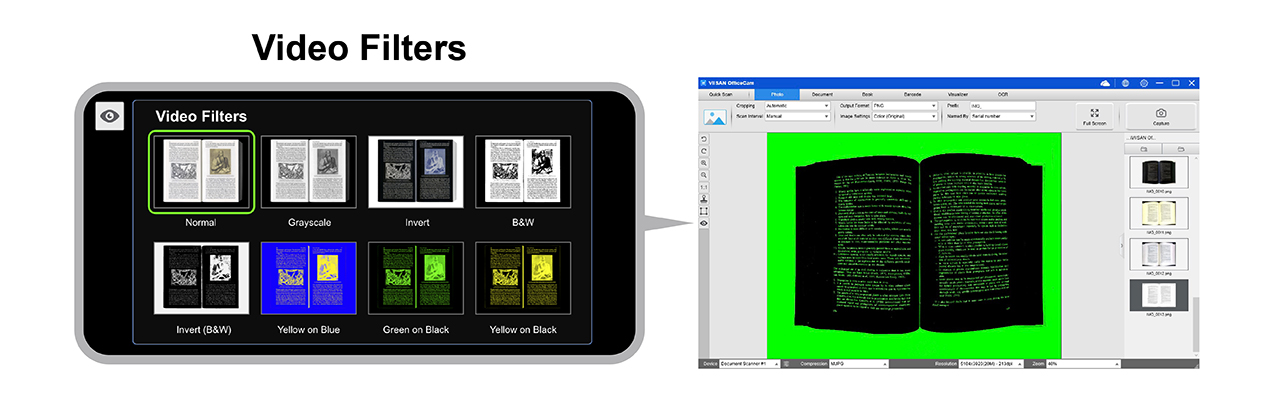
OfficeCam now includes multiple visual filter options tailored to different low-vision needs. Users can select filters such as Invert, Black and White, Yellow on Blue, and Green on Black to improve contrast and readability, creating a more comfortable and personalized reading experience.
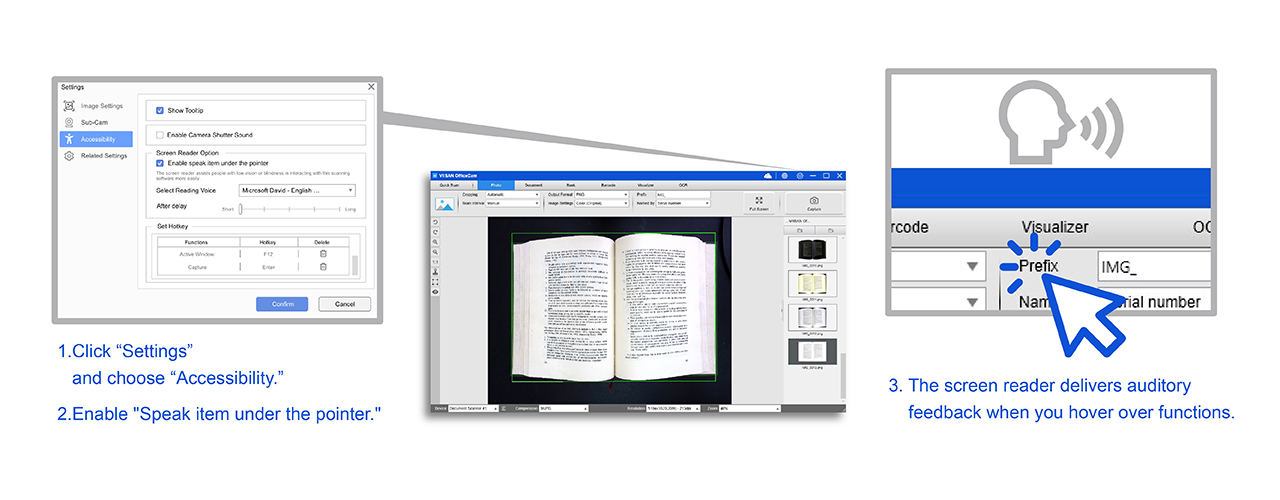
The built-in screen reader enhances OfficeCam accessibility for users with low vision or blindness. When navigating the interface, users receive instant voice feedback describing each function, enabling confident scanning, document management, and system navigation.
VIISAN high-speed document cameras and the VisualCam Lite web application provide advanced document management and accessibility tools suitable for education and business environments. With OCR text recognition, automatic edge detection, barcode and QR code scanning, and enhanced image processing, users can quickly convert physical documents and ID cards into digital formats such as Word or PDF.
VisualCam Lite, developed as a Progressive Web App, brings visualizer functionality directly to the browser and includes accessibility-focused features that enhance clarity and navigation for low-vision users.
Launch VisualCam Lite

Guided by the philosophy of “Technology for Humanity,” VIISAN remains committed to inclusive design. We continuously innovate not only to enhance operational efficiency but also to empower underserved communities, ensuring equal access to information through accessible technology.
Enhanced visual filters help users read printed documents with improved contrast and reduced eye strain.
Voice feedback supports users when accessing key scanning, viewing, and document management functions.
OCR and image processing tools help convert physical documents into digital content for easier use and sharing.
Looking ahead, VIISAN will continue developing advanced accessibility solutions to ensure all users can benefit from digital innovation and inclusive document technologies.

Helpful answers for users and organizations evaluating VIISAN OfficeCam accessibility features for low-vision reading support.
OfficeCam supports low vision users with visual filters, screen reader functionality, real-time voice guidance, OCR, image enhancement, and document viewing tools designed to improve readability and navigation.
OfficeCam includes visual filter options such as Invert, Black and White, Yellow on Blue, and Green on Black to improve contrast and create a more comfortable reading experience.
Yes. The built-in screen reader provides voice feedback while users navigate the OfficeCam interface, helping low vision and blind users operate scanning and document management functions more confidently.


